How HR Teams Pick a CV Screening Tool in 2026: A Practical Buyer's Guide
Choose the right CV screening tool with a four-stage buyer mindset and five essential features to streamline your hiring process and boost efficiency.
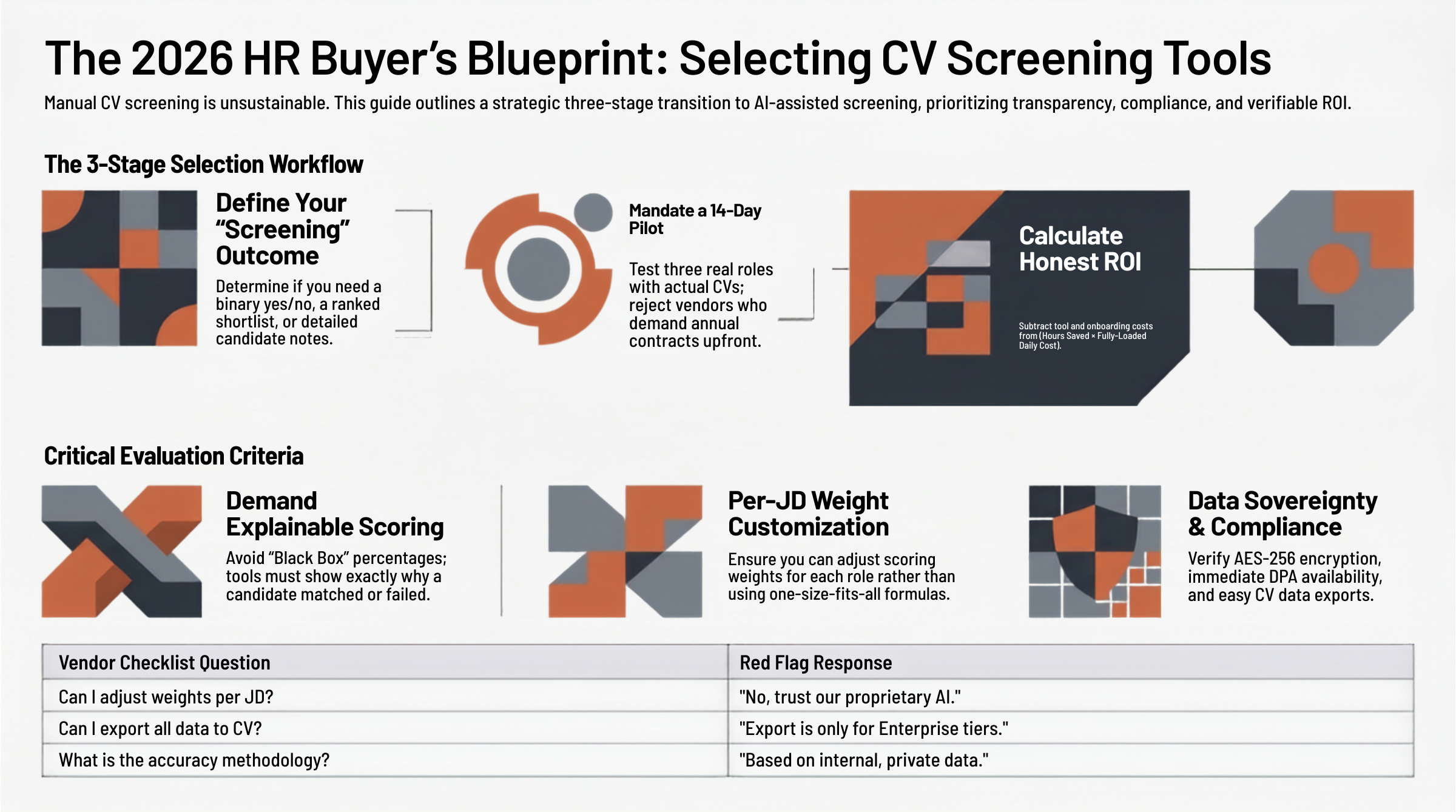
The average corporate job opening pulls in dozens to hundreds of applications within a week. For HR teams that still screen manually, the math is brutal: even at two minutes per CV, 200 applications eats an entire workday. Multiply that across five open roles, and screening alone consumes a recruiter's week before a single interview is scheduled.
CV screening tools promise to fix this. Most do — if you pick the right one. Pick the wrong one and you'll spend more time fighting the tool than you ever saved.
This guide walks through how to evaluate CV screening software in 2026 without the marketing fluff. You'll get a four-stage buyer mindset, the five features that actually matter, the red flags that signal trouble, an honest ROI calculation, and a ten-question vendor checklist you can use this week.
The 4-Stage Buyer Mindset
Smart buyers don't compare features first. They compare to their own workflow first. Here's the sequence that prevents expensive mistakes.
Stage 1: Define what "screening" actually means for your team
"Screening" is a loaded word. For some teams it means a yes/no decision in 30 seconds. For others it means producing a ranked shortlist of 5–10 candidates with notes. Before you look at a single product page, write down:
- How many CVs do you receive per role, on average?
- What's the outcome of a screening pass — shortlist, score, rejection notes?
- Who acts on the screening output — the recruiter, the hiring manager, both?
- What information do you need to keep for compliance (PDPA, GDPR, CCPA)?
If you can't answer these in one sitting, no tool will save you. The tool fits the workflow, not the other way around.
Stage 2: Score-card the tools against your real workflow
Build a simple table: rows are candidate tools, columns are your top 5–7 must-haves. Fill it in with screenshots, not vendor claims. If the demo doesn't show you the feature in 30 seconds, treat it as missing.
Stage 3: Pilot before you commit
Two weeks. Three open roles. Real CVs. Most credible vendors offer a free trial — if they don't, ask why. If a vendor pushes you into an annual contract without a pilot, walk away.
Stage 4: Calculate ROI vs. total cost — not just sticker price
Sticker price is rarely the largest cost. Onboarding time, training, integration with your ATS or HRIS, and data migration all add up. We'll do the math in the ROI section below.
5 Must-Have Features in 2026
Every credible CV screening tool in 2026 should have these. If any are missing, demand them — or move on.
1. Explainable scoring (no black box)
If the tool returns a single number — "Match Score: 78" — and nothing else, run. Modern HR demands explainability. You should see why a candidate scored where they did: which skills matched, which experience aligned, where gaps exist. Without this, you can't defend a hiring decision and you can't improve your job descriptions.
2. Customizable scoring weights
A senior backend role and an entry-level customer success role weight skills, experience, and education very differently. Tools that lock you into a one-size-fits-all formula force you to either ignore the score or fight it. Look for the ability to adjust weights per job description, not just globally.
3. PDPA / GDPR-compliant by default
CV data is personal data. The default behavior of your tool should respect that:
- Encrypted storage (AES-256 at rest, TLS 1.3 in transit)
- Auto-delete policies (cascade delete when a JD closes; cleanup after subscription cancel)
- Audit logs for every PII access
- A real Data Processing Addendum (DPA) — not a paragraph buried in the Terms of Service
If a vendor can't email you their DPA the same day you ask, treat that as a red flag.
4. Side-by-side comparison view
Reviewing candidates one at a time is slow. The tools that save the most time let you compare the top 3–5 candidates against the JD on one screen, with skill alignment, experience overlap, and notes visible at a glance.
5. Bulk and single-CV flexibility
Some weeks you upload 200 CVs at once; some weeks a hiring manager forwards you a single CV from a referral. The tool should handle both without making you fight the UI.
5 Red Flags to Walk Away From
The product page won't tell you these. The contract will.
Red Flag 1: "AI score" with no breakdown
If the only output is a percentage, the tool can't tell you why — which means you can't tell anyone why. This is a legal risk and an operational dead end.
Red Flag 2: Vendor lock-in via crippled exports
Check before you sign: can you export your full candidate database, with notes and scores, to CSV? If the answer is "we'll send you a file on request" or "export is on the Enterprise tier," you've found a lock-in.
Red Flag 3: Per-CV pricing that punishes volume
Per-CV pricing sounds fair until you realize that high-volume screening — the use case CV tools are for — costs the most. Look for tiered subscription pricing with reasonable monthly caps, not metered billing that penalizes the months you need the tool most.
Red Flag 4: No customization, just "trust our AI"
Vendors who refuse to let you adjust scoring weights are usually hiding a generic model with no domain tuning. You wouldn't trust a generalist for senior hires — don't trust a generalist algorithm either.
Red Flag 5: Quantitative claims with no methodology
"Save 80% of screening time." "95% accuracy." If you ask for the methodology and the answer is "internal data" or silence, the claim is marketing. Honest vendors will tell you exactly how they measured, on what dataset, with what reviewer agreement.
The Honest ROI Calculation
Here's a simple formula that survives scrutiny in budget meetings:
Monthly ROI = (Hours saved × fully-loaded hourly cost) − Tool cost − Onboarding cost (amortized over 12 months)
Three things make this honest:
- Hours saved comes from your pilot, not the vendor's marketing copy. Time yourself screening 50 CVs without the tool, then 50 with it. The difference, scaled to monthly volume, is your real number.
- Fully-loaded hourly cost includes salary, benefits, and overhead — typically 1.3–1.5× base salary divided by ~2,000 working hours per year.
- Amortize onboarding so you don't underestimate Year 1 costs. A tool that takes a week to set up has a real cost, even if the seat fee looks small.
If the math doesn't work in your pilot, no marketing campaign will make it work in production.
The 10-Question Vendor Checklist
Print this. Use it on every demo call.
- Can you show me the scoring breakdown for one candidate, live?
- Can I adjust scoring weights per job description?
- What's your data retention default, and can I shorten it?
- Will you send me your DPA today?
- Can I export my full candidate database to CSV right now?
- What does a 14-day pilot look like — and who supports it?
- How do you measure your accuracy claims, and on what dataset?
- What's your monthly cap on CVs per tier, and what happens above it?
- Which integrations do you support — and how long does setup take?
- If I cancel, how fast does my data get deleted, and how do I get a confirmation?
A vendor that can answer all ten in a 30-minute call is a vendor that respects HR's time.
The Bottom Line
The HR teams that get screening right in 2026 don't pick the flashiest tool. They pick the tool that fits their workflow, explains its decisions, respects their candidates' data, and lets them adjust as their hiring needs change.
If you'd like to see explainable scoring, per-JD weight customization, and a transparent process in practice, try CeeVeeMatch free — no credit card, no contract. Screen your next batch in our free tier and judge the output for yourself.
The right tool earns its keep on the first batch. Make it prove it.
Try CeeVeeMatch
Screen 100 CVs in under 5 minutes.
Drop in a JD, drop in your inbox, get a defensible shortlist with reasoning. Free trial — no card surprise.